March 3rd, 2026

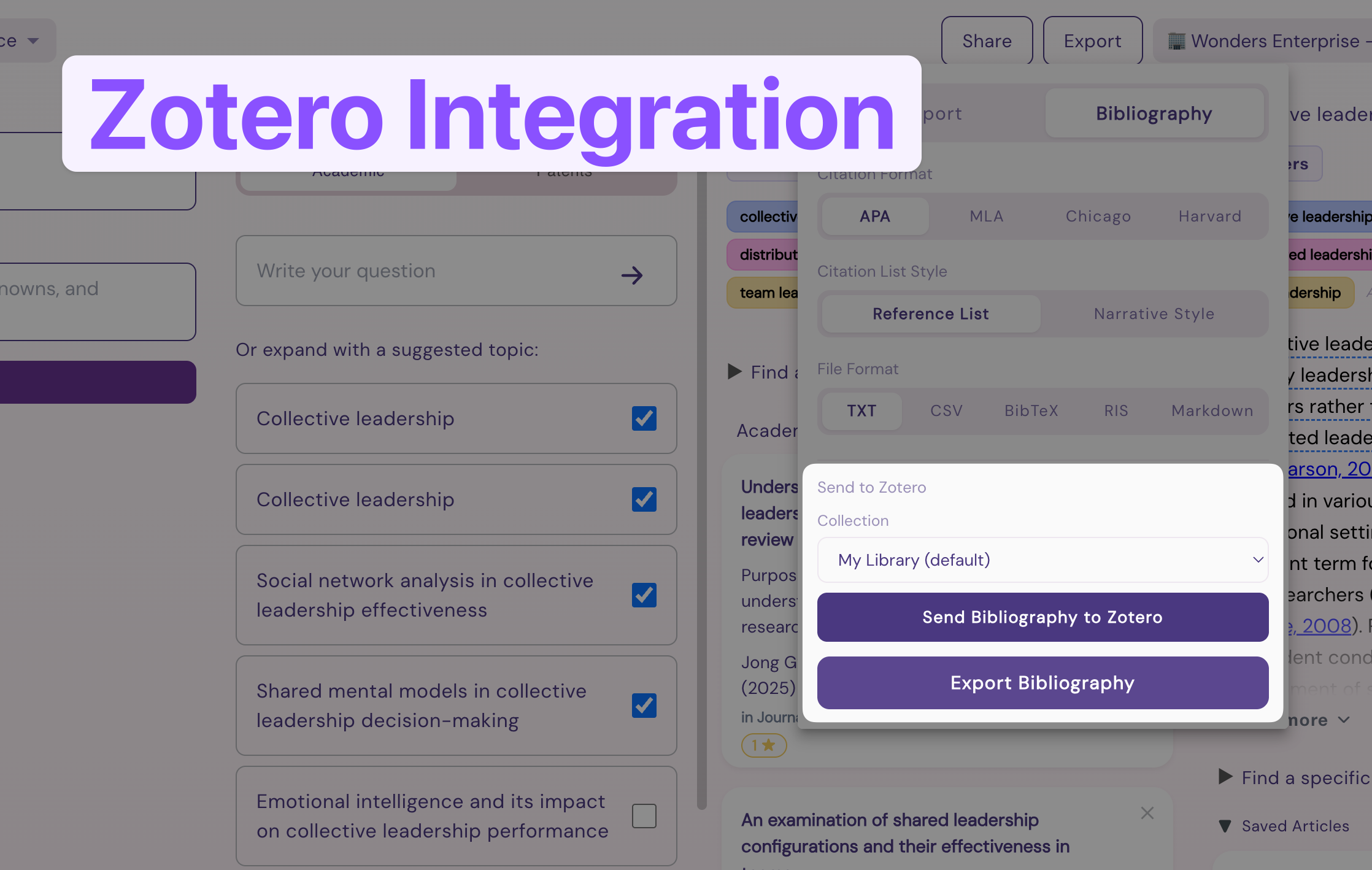
Zotero integration is now available in Wonders! Connect your Zotero account in Settings or in the Export > Bibliography dialog and push your Wonders findings directly into Zotero.
The integration supports:
Regular push
Collection selection
Collection creation
Currently, Wonders will push all the most relevant papers used for summaries and any papers you’ve saved to topics.
Let us know what you think about the integration.
- Wonders Team
February 26th, 2026

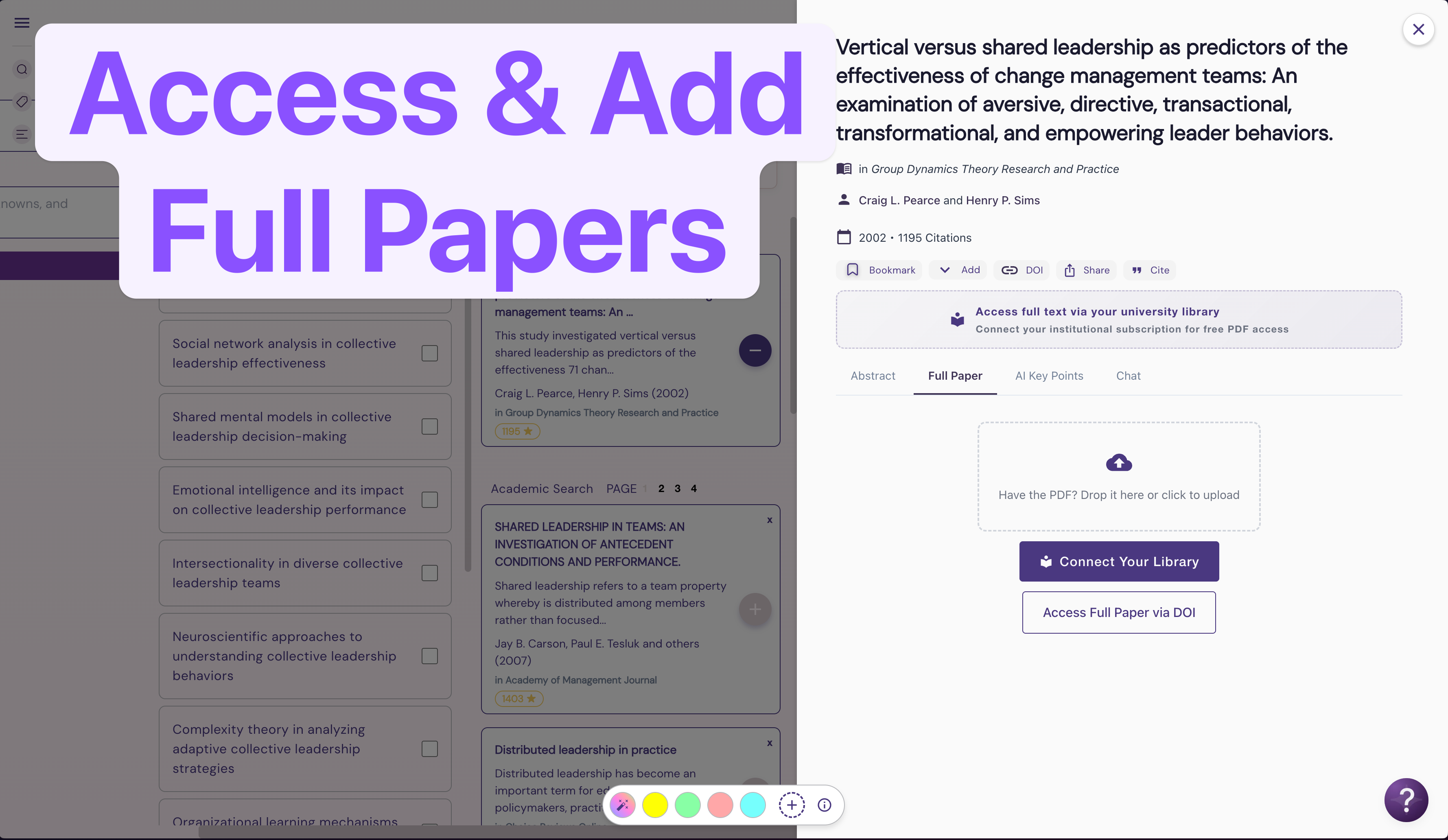
Paywalled papers? No problem! Wonders now has two new ways to add papers behind a paywall into your personal workspace.
You can upload a PDF into your personal library (not shared with the rest of the Wonders community, except for users invited directly to your board). Simply click upload on the Full Paper tab as below:


Once the paper is uploaded, the full-text will appear in Wonders and will become available to the AI system for analysis.
Alternatively, you can add your Library access ID into your Wonders account and access papers automatically.
Click “Connect Your Library” or “Access full text via…”

Add your Library ID (if you’re unsure what is this, check with your library services, they will be able to assist!)

And that’s it, you will now have the ability to access any papers your school is subscribed to.
NB: We’re aware that there are different systems for accessing paid library resources and we’re working on supporting more providers. If your system isn’t supported yet—please use the PDF upload feature for now.
– Wonders Team
February 25th, 2026

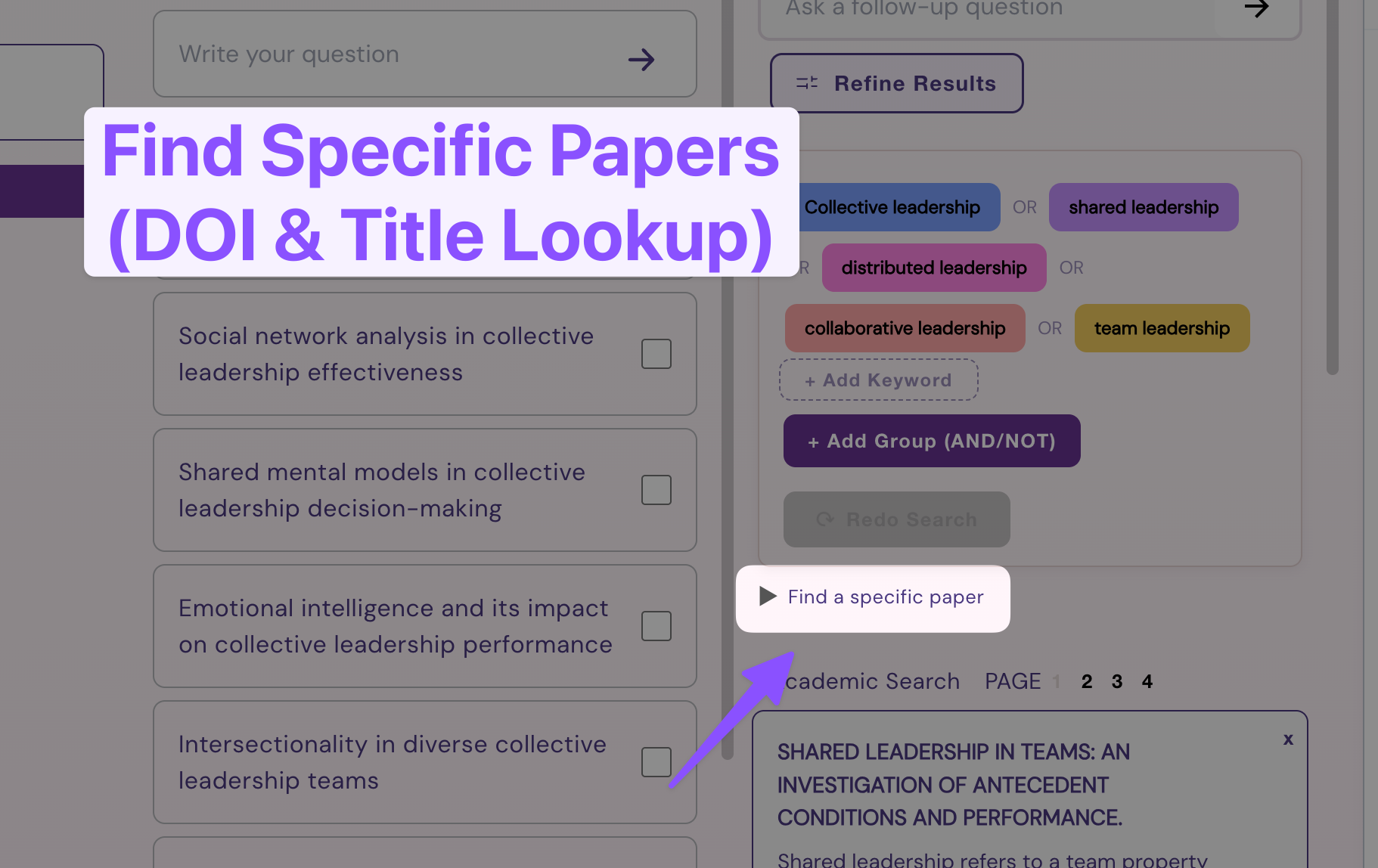
Wonders has always been great for exploration, but finding specific papers meant juggling keywords and Author filters. We heard your feedback and added an easier way to lookup specific papers by DOI and Title. Here’s how to do it…
Unfurl the “Find a specific paper” search box

Enter your desired paper DOI or Title (partial title also works):
DOI Lookup

Title Lookup (can also be just part of the title - Wonders will pull up several matching papers)

Find your paper

Click (+) Save to Topic to keep your paper in your project

Keep your fresh new paper handy!

And that’s it. After saving the paper into your topic, it will become part of your research board’s library until you choose to remove it. We’re also adding new ways to access full-text PDFs directly in Wonders.
Let us know what you think of this new feature & drop any other ideas on how might we support your research workflows on our Feedback Portal.
– Wonders Team
February 24th, 2026
We have shipped a redesigned filter overlay with an improved design. Following popular requests, the filters now make it much easier to identify high-quality literature.
You can now use Wonders’ new “Peer Reviewed” filter to only search for literature published in peer-reviewed journals. This is a great way to exclude any pre-prints, thesis, or grey literature from appearing in your search results

You can also sort for Seminal Papers — this function uses our new algorithm for identifying literature that has had great impact on its field.

This unlocks brand new possibilities for exploring literature with combinations of Seminal Papers, Peer-Reviewed, or Open Access literature. Helping you set-up search combinations most suitable for your field.
For example, if you are researching in the fast moving field of Machine Learning and Artificial Intelligence, checking “Open Access” and sorting by “Seminal Papers” will help you surface the most impactful pre-prints. Conversely, if you’re in Neuroscience, checking “Open Access” off, “Peer Reviewed Only“, and choosing “Seminal Papers” will point you to the most reputable journals.
We’re working on additional ways to slice and dice literature across different journal levels. Stay tuned for future updates! And as always, let us know your thoughts.
— Wonders Team
January 21st, 2026

It is now easier to identify where papers come from:
All papers will now show its originating journal in the card
Open Access papers (those with free PDF) will be marked with a green OA badge
January 12th, 2026
We have shipped a major batch of performance improvements. Wonders should now feel a lot more stable and snappier as a result.
This update:
Squashes several rendering bugs (flickering, blinking)
Reduces connection interruptions on hitting back buttons (and prevents data loss)
Caches content locally, making daily work faster
Reduces overall loading speeds and website payload
Improves search speed and summary generation
Wonders already shortens literature review from weeks to days, but who are we kidding—nobody likes watching loading indicators spin endlessly. Speed & performance matters for daily tasks.
Hopefully you will find working with Wonders a lot faster now—allowing you to finish your literature explorations even faster.
As always, feel free to let us know your thoughts on our Feedback Portal.
– Wonders Team
December 16th, 2025
A key feature for transparency and research integrity, full citation sourcing, is now live.
When working with academic literature, citation transparency is key to research integrity—any source needs to be fully understood in its original context to avoid misrepresenting data and making false argumentation.
This is of ultimate importance with AI-supported tooling. As is well known, language models can be prone to hallucinations (making stuff up). While Wonders is generally tuned to reduce hallucinations and only draw directly from cited text—Citation Sourcing is a major step forward to ensuring you can be confident in the used resources.
All key argument summaries now contain Citation Sourcing—an underlined text. When you hover each argument, a pop-up will show you where the quote originates from.
There are four possibilities:
Green - Direct Quote from a paper
Multi-Source Quote - paraphrased from multiple agreeing sources
Paraphrased Source - Edited language to better fit the narrative
Inferred - Filler language or inference (triple check!)


We hope you’ll find Citation Sourcing useful for your workflows. Please let us know how you’re finding this feature and how could we improve it further!
— Wonders Team
October 20th, 2025

Excited to announce this our latest core feature update — Thesis Editor. This is a major step to fulfilling a complete academic workflow. With the Thesis Editor you can start your research in Wonders and finish your Draft, with full citations, highlights, and supervisor access all in one place. Goodbye Zotero, Word, GoogleScholar and 47 tabs!
Access the editor by clicking “Expand” in the notebook column at the end of your research project. (You can also write directly in the notebook)

Once inside, you will access the focused writing editor, complete with your Articles Library and Highlights.

Click on any citation to directly quote it in your text (but make sure you’ve verified its accuracy and understood its context by reading the full-text first). Similarly, you can click on any Article to add its bibliographical reference at the end of your sentence.
The editor supports basic styling with three levels of headlines, bold, and italics, and you can use Markdown to speed up your writing workflow.
We’re working on ways to bring full-text analysis, highlighting, and citing even closer together. Our hope is to make each sentence a robust, fully-traceable block with complete provenance to hold your argumentation even more solid.
Let us know what you think of the editor & welcome to make any suggestions on our Feedback Portal.
June 7th, 2025
We are bringing a fresh drop of features for our Team & Enterprise plans… alongside other important improvements!

We have launched the v1 of our Company Dashboard—allowing org admins to access ROI critical analytics, measure the impact of their deployment, and manage users.
You can visit your company dashboard by clicking on the company dropdown in the top left header, and choosing your company. Let us know what you think (just hit reply)!
We have taken another major step towards completing the Wonders workflow—you can now save the most pertinent papers directly to your search column.
Soon we will be adding an option to use your saved papers for AI processing.

Credit management is now live. You can now see your plan reflected in the top right corner. If you reach your plan limits, you will see a dismissible popup letting you know—you can still access all your boards and results, but creation and searches will be limited until your next period reset or upgrade.

We also fixed a bug preventing users from saving articles to lists. Lists are a global system for managing your paper library. On any article detail, you can click "Add to" and create or choose a list you'd like to store this paper in.

That said, we think that Save To Workflow will become a better place to store your articles directly in the right context.
✅ Improved summaries with consistent bullet point behavior
✅ UI Refresh bug fixed - Wonders will no longer refresh when navigating to another tab
✅ Mobile view encouraging to use on desktop-only
✅ Comments are consistently visible to all project members
✅ Redo Search - Changing Keywords
✅ Fixed horizontal scrolling in conclusions
✅ Optimized our AI systems for performance
✅ Add users by domain - companies now support multiple domains
✅ Fixed ability to leave companies
✅ Improved conclusions text
May 13th, 2025
New
Fixed
Our most-requested feature is live: Wonders now speaks 14 languages, including Portuguese, Japanese, and German.
Switch your language in: Menu > User > Settings > Language
The full UI, topics, summaries, and chat now respond in your chosen language
To search in other languages, you’ll still need to adjust your keywords or boolean terms manually
If you notice any translation oddities, let us know!
Advanced Tip: Configure a board to narrow on literature in specific language results by following the steps below. We will be working working on making multilingual search more seamless at a later stage.

✅ Invite links now work for logged-out users
✅ Faster loading through better caching
✅ Fixed credit overuse on multi-submit; more coming
✅ Smarter, more relevant summaries
✅ More relevant patent search results
✅ Improved citation logic (especially in summaries)
✅ Better Boolean search behavior
✅ Even less intrusive credit overlay